2026 hardware selection
Repurpose a "gaming" PC into a sovereign writing workshop.
Forget flashy marketing and LED lights. Under the hood of these machines lies the most important component for running a generative AI locally: an NVIDIA RTX graphics card with enough VRAM.
Quick summary of our top picks (2026)
| Model | Key Feature | VRAM & AI Ready | Availability |
|---|---|---|---|
| 🏆 ASUS ROG Strix G16 | Powerhouse (Flawless cooling) | RTX 5070 Ti (12 GB VRAM) | Check Price → |
| 👁️ Lenovo Legion 5i (OLED) | Perfect contrast for eye-strain | RTX 5070 (8 GB VRAM) | Check Price → |
| 💰 Acer Nitro V 15 | Best value on a budget | RTX 5060 (8 GB VRAM) | Check Price → |
🎯 NaNoWriMo 2026 Goal
Nothing is more frustrating than a computer that stutters when inspiration strikes. To keep up with the intense pace from November 1st to 30th, having an RTX graphics card with enough VRAM is your best asset: it will run LocalProse's local AI without latency. Gear up during Preptober so you never get stuck.
Read the survival guide to win NaNoWriMo 2026 →
Why an NVIDIA RTX laptop?
For a traditional writer, a gaming PC is an aberration: it's heavy, has only a few hours of battery life, and is overpowered for typing text. But for the augmented author who uses LocalProse, it's the ultimate tool.
Artificial intelligence models (like Llama 3, Mistral, or Gemma) love the "Tensor" cores found in NVIDIA graphics cards. The number one criterion to look at when purchasing is not the processor, but the VRAM (video memory). For optimal writing comfort, aim for a minimum of 8 GB of VRAM (RTX 4060 or RTX 5070).
Writing and gaming on the same machine: the noisy PC myth
Many authors hesitate to buy a "gaming" oriented computer for fear of ending up with a noisy and bulky machine, disproportionate to their use. However, looking for a laptop for writing and gaming is now the most strategic choice for an informed, tech-savvy creator.
Modern chassis have evolved considerably. In "word processing" mode, these computers are perfectly silent. Their powerful cooling systems only activate when you launch a demanding video game or when you call upon the artificial intelligence to analyze your manuscript. It's the perfect Windows computer for the writer: discreet on a daily basis, super-powerful on demand.
Moreover, this hybrid format excels in versatility. Back home, it transforms into a formidable workstation: prop it up on a stand, plug it into a monitor designed for visual comfort, and type on an ergonomic keyboard to rediscover the absolute comfort of a sedentary desk without ever sacrificing your mobility.
Our selection for authors
We have selected sleek chassis (without excessive gaming aesthetics) equipped with excellent keyboards and controlled ventilation so your AI can analyze your texts in peace.
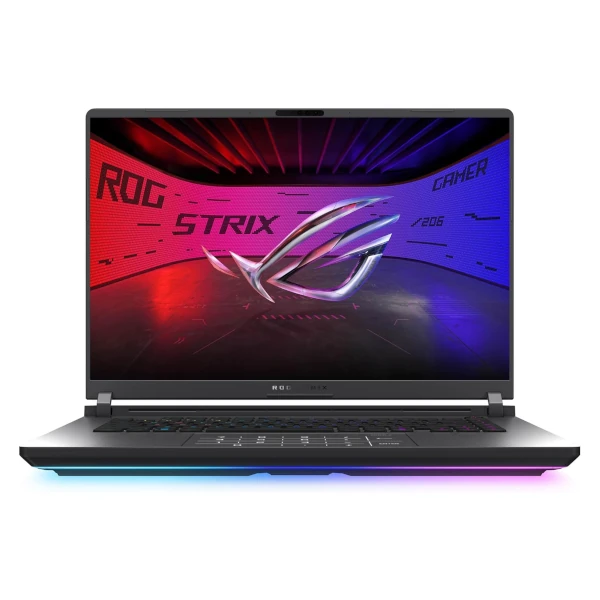
ASUS ROG Strix G16 (RTX 5070 Ti)
- GPU: NVIDIA RTX 5070 Ti (12 GB VRAM)
- RAM: 32 GB DDR5
- Storage: 1 TB SSD
- Screen: 16" 16:10 2.5K Nebula Display
- The LocalProse perk: It effortlessly hosts the LocalProse Gemma 3 12b model thanks to its dedicated VRAM. The 16:10 aspect ratio provides more vertical space for your text, while the advanced vapor chamber cooling guarantees a perfectly quiet environment during your longest writing and brainstorming sessions.

Lenovo Legion 5i (RTX 5070)
- GPU: NVIDIA GeForce RTX 5070 (Blackwell architecture)
- Processor: Intel Core i7-14700HX
- RAM: 16 GB DDR5 5600 MHz (Expandable up to 64 GB)
- Screen: 15" Lenovo PureSight OLED
- The LocalProse perk: The PureSight OLED display is a game-changer for writers: it delivers infinite contrast and true blacks, making your software's dark mode incredibly restful for your eyes. Furthermore, the "Legion Coldfront: Hyper" cooling system guarantees whisper-quiet operation when the AI analyzes your texts, all packed in a highly portable 4.4 lbs chassis.
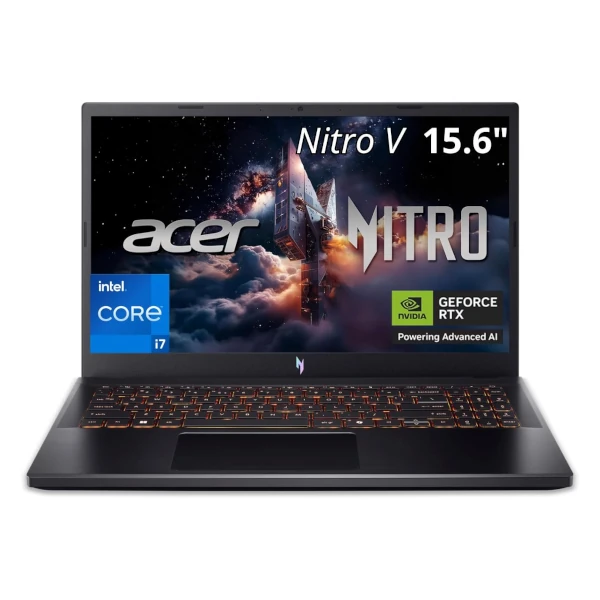
Acer Nitro V 15
- GPU: NVIDIA RTX 5060 (8 GB VRAM)
- RAM: 16 GB DDR4
- Storage: 512 GB SSD
- Screen: 15.6" FHD 165Hz
- The LocalProse perk: The architecture of this new NVIDIA generation (5000 Series) offers better thermal efficiency. The AI analyzes your texts without making the fans scream, and the 165Hz screen guarantees smooth scrolling when proofreading your long manuscripts.
Why a laptop's VRAM changes the game
Contrary to popular belief, using a local artificial intelligence is not meant to "write for you". When you push a 4-billion parameter model to the limits of an RTX 5060 or 5070 card via a writing software like LocalProse, you have an effective critical mirror. The AI analyzes your chapters, helps you create your character sheets, and questions the consistency of your narrative arcs with surgical precision. Having this power under the hood of your Windows laptop means giving yourself a private reading committee, without ever compromising the security of your drafts.
Be careful though: the mobility of this formidable tool exposes you to other material risks (shocks in transit, theft in a cafe, loss). Since the philosophy of local AI implies refusing the public cloud, it is essential to pair your laptop with a rigorous external backup strategy (rugged SSDs, Mini-NAS) to guarantee the longevity of your years of work.
🍎 See also: the Apple alternative
Do you favor extreme nomadism and absolute silence (zero fans)? The memory architecture of Apple's M-Series chips offers a radically different but equally formidable approach to local
artificial intelligence.
Discover our selection of the best Macs for writing →
🖥️ The sedentary alternative: If you ultimately realize that your machine will never leave your desk, paying for a battery and a built-in screen is pointless. Instead,
maximize your raw power budget by opting for a desktop machine.
See our selection of desktop PCs and Mini-PCs for local AI
→
Warm up the VRAM, download LocalProse
Have you found the ideal machine? All you need now is the software capable of exploiting it. Protect your texts and create without limits.